
Tutorial Listening
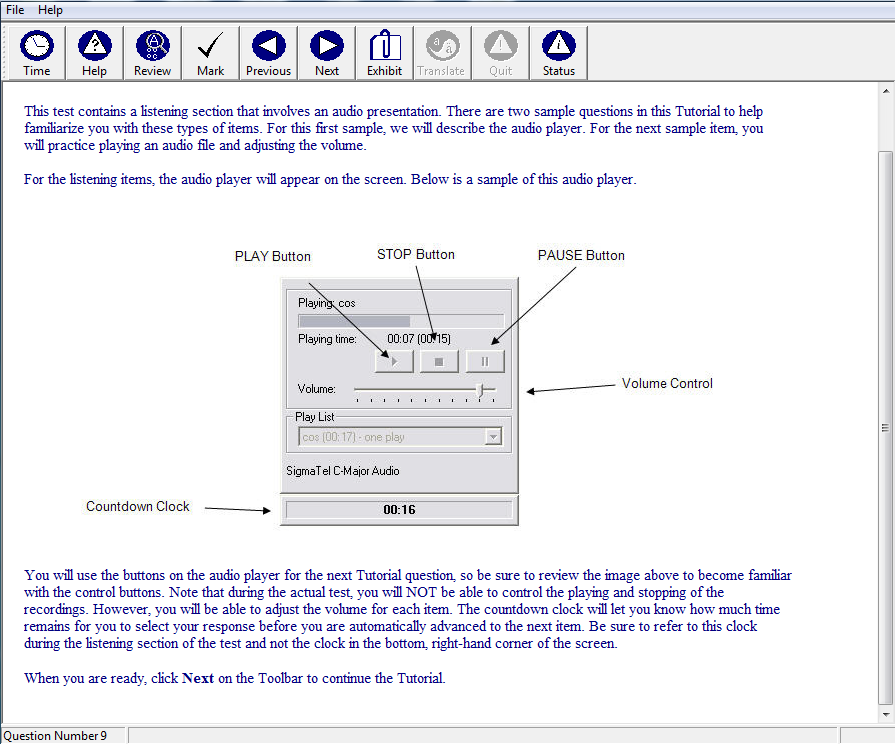
The test toolbar has icons and labels for time, help, review, mark, previous, next, exhibit, translate, quit, and status.
The screenshot reads: This test contains a listening section that involves an audio presentation There are two sample questions in this Tutorial to help familiarize you with these types of items. For this first sample, we will describe the audio player. For the next sample item, you will practice playing an audio file and adjusting the volume.
For the listening items, the audio player will appear on the screen. Below is a sample of this audio player.
An image of the player is shown. The player contains the following features:
- PLAY Button, STOP Button, PAUSE Button
- Playing time: 00:07 (00 out of 15)
- Volume control
- A play list indicating "Sigma Tel C-Major audio"
A countdown clock is shown at the bottom of the sample audio player, reading 00:16
You will use the buttons on the audio player for the next Tutorial question so sure to review the image above to become familiar with the control buttons. Note that during the actual test, you will NOT be able to control the playing and stopping of the recordings. However, you will be able to adjust the volume for each item. The countdown clock will let you know how much time remains for you to select your response before you are automatically advanced to the next item. Be sure to refer to this clock during the listening section of the test and not the clock in the bottom, right-hand corner of the screen. When you are ready, click Next on the Toolbar to continue the Tutorial